
General Requirements:
You should create your programs with good programming style and form using proper blank spaces, indentation, and braces to make your code easy to read and understand.
- You should create identifiers with sensible names.
- You should make comments to describe your code segments where they are necessary for readers to understand what your code intends to achieve.
- Please add the following head in your program:
/*
My name:
My student number:
My course code: CSIT121 My email address:
Assignment number: 2
*/
Objectives
In this assignment, you are required to design and implement a Trip Management System (TMS) in Java. The related topics include interface, abstract, polymorphism, and file I/O.
Background
The TMS helps a company to manage employees, vehicles, and trips. The program displays a menu so that a user can choose what to do. Such as displaying data, finding data, and saving trip data into a text file.
Using the Object-Oriented Design (OOD) method, first, we define an interface class MyIO that only consists of two public methods: readData(Scanner) and writeData(Formatter).
Then define two classes Employee and Vehicle that implement the interface methods. Define subclasses Driver and Mechanic that inherit the class Employee, and sub-classes Truck and Van that inherit the class Vehicle.
The Trip class implements the interface methods and associates with a class Driver and classes Truck and Van.
The System Management class is associated with classes Employee, Vehicle and Trip. It contains ArrayList objects to store the loaded data for employees, vehicles, and trips.
The UML class diagram of TMS is given below. You can add new classes, methods and attributes in the UML class diagram but CAN NOT modify or delete any existing classes, attributes, and methods. Your java implementation must be consistent with the UML class diagram.
A company TMS application initially loads data of employees, vehicles, and trips from text files.
The format of a file employees.txt contains the data like:
D,1,John,Smith,1990-02-10,42 Victoria St. Hurstville NSW,2456,10001,AVAILABLE
D,2,Peter,Taylor,1970-01-12,42 Victoria St. Hurstville NSW,2456,10008,ONLEAVE
D,3,John,Doe,1966-03-23,12 Station St. Dapto NSW,2530,10002,AVAILABLE
…
D,18,Harry,Potter,1995-04-01,568 Bong Bong St. Horsley NSW,2530,10705,AVAILABLE
D,19,James,Bond,1990-02-10,7 Alan Bond St. Perth WA,6000,40005,AVAILABLE
M,20,Robin,Hood,1990-02-10,6 Nottingham Pl. Sydney NSW,2000,A7654321,SUPPORT
Each row is a record of an employee. The first character is the type of employee. The letter D means it is a driver record. The letter M means it is a mechanic record. Each field is separated by a character comma (,).
A driver record contains an employee number, first name, last name, date of birth, address, postcode, license number, and status.
A mechanic record contains the same 6 fields. The last two fields are qualification number and experience.
The format of a file vehicles.txt contains the data as follows:
T,AL08UK,50000.00,5000.00 T,GFT008,40000.00,15000.00
T,KKK007,10000.00,3000.00
…
T,XCF003,30000.00,10000.00
V,TMY001,Delivery
V,SUE001,People-Mover
Each row is a record of a vehicle. The first character is the type of vehicle. The letter T means it is
a truck record. Each field is separated by a character comma (,). The letter V means it is a van record.
A truck record contains a registration number, capacity, and weight. A van record contains a registration number, and purpose.
The format of a file trips.txt contains the data like:
1,2015-01-12,1,PKR768
5
1,Sydney,Melbourne
2,Melbourne,Hobart
3,Hobart,Perth
4,Perth,Adelaide
5,Adelaide,Wollongong
2,2015-02-20,1,SYF777
1
1,Sydney,Melbourne
3,2015-03-12,1,KKK007
1
1,Sydney,Melbourne
…
A trip consists of a trip number, trip date, employee number, truck registration number, and trip leg information.
Each trip may have one or more trip legs. An integer number below a trip number indicates how many trip legs. Then it is followed by all trip legs of the trip. Each trip leg consists of a leg number, departure city name, and destination city name. Each field is separated by a character comma (,).
Hint: You can call the method useDelimiter(“,|rn|n”) of Scanner before to get input data from the given text files.
After loading the data into the containers, the main() method display menu and ask a user to choose an item until the input value is 0.
- If an input value is 1, the program all data into the ArrayLists
- If an input value is 2, the program displays all employees’ information from the container employees.
- If an input value is 3, the program displays all vehicles’ information from the container vehicles.
- If an input value is 4, the program displays all trips’ information from the container trips.
- If an input value is 5, a user inputs an employee number. Then the program searches and displays the employee’s information if it exists. Otherwise, displays an error message, such as The employee does not exist.
- If an input value is 6, a user inputs a registration number. Then the program searches and displays the vehicle’s information if the vehicle exists. Otherwise, displays an error message, such as The vehicle does not exist.
- If an input value is 7, a user inputs a trip date. Then the program searches and displays all trips on the date. Otherwise, displays an error message, such as No trip on this date.
- If an input value is 8, a user inputs all information for a trip. Then the program adds the new trip to the container trips. The program needs to validate the input trip number, employee number and vehicle registration number. The trip number cannot exist. The employee number and vehicle registration number must exist.
- If an input value is 9, the program stores the data of trips. The format of each text file must be the same as the test file txt displayed above.
- If an input value is 0, the program displays a message Bye, then exits.
Tasks
Task 1: (2 mark) Complete/update the program design based on the given UML class diagram. You CANNOT modify or delete any existing class, interface, attributes, and methods. You can add new classes, associations, and methods. Complete the UML activity diagram.
Task 2 (6 marks): Implement the system according to the UML class diagrams. The program shall
- assume the customer’s inputs are always correct and valid.
- be consistent with the UML class diagrams.
- follow the conventions for naming all classes, variables, and methods.
- provide sufficient comments.
- use proper blank spaces, indentation, and braces to make your code easy to read and understand.
- follow the specified steps.
- be able to repeat the main menu until the customer exists the system.
- be implemented by using the advanced OOP features such as inheritance, polymorphism, abstraction, interface, and instanceof class.
Task 3 (2 marks): Compilation and test.
- Please carefully compile your program and make sure your program can pass the compilation by using “javac” command.
- Test your program to all the items in the main menu.
- Please do not define the package in your program (a special alert for students who use IDE to complete the assignment).
Submission:
- Please submit your solution to Moodle (Assignment 2). Email submission is NOT accepted.
- Please submit an individual PDF document (SystemManagement.pdf) to contain your answers for Task 1 and Task 3. For Task 1, please include the UML activity diagram. For Task 3, please include the snapshots to clearly shows the compilation, the execution of your program based on the testing request.
- Please submit all java codes for Task 2 and make sure the primary class’s name is java.
NOTES:
Enquiries about the marks can only be made within a maximum of 1 week after the assignment results are published. After 1 week the marks cannot be changed.
Mark deductions: compilation errors, incorrect result, program is not up to spec, poor comments, poor indentation, meaningless identifiers, required numeric constants are not defined, the program uses approaches which has not been covered in the lectures. The deductions here are merely a guide. Marks may also be deducted for other mistakes and poor practices.
- Load data
- Display all employees
- Display all vehicles
- Display all trips
- Find an employee
- Find a vehicle
- Find a trip
- Add a trip
- Save data
- Exit
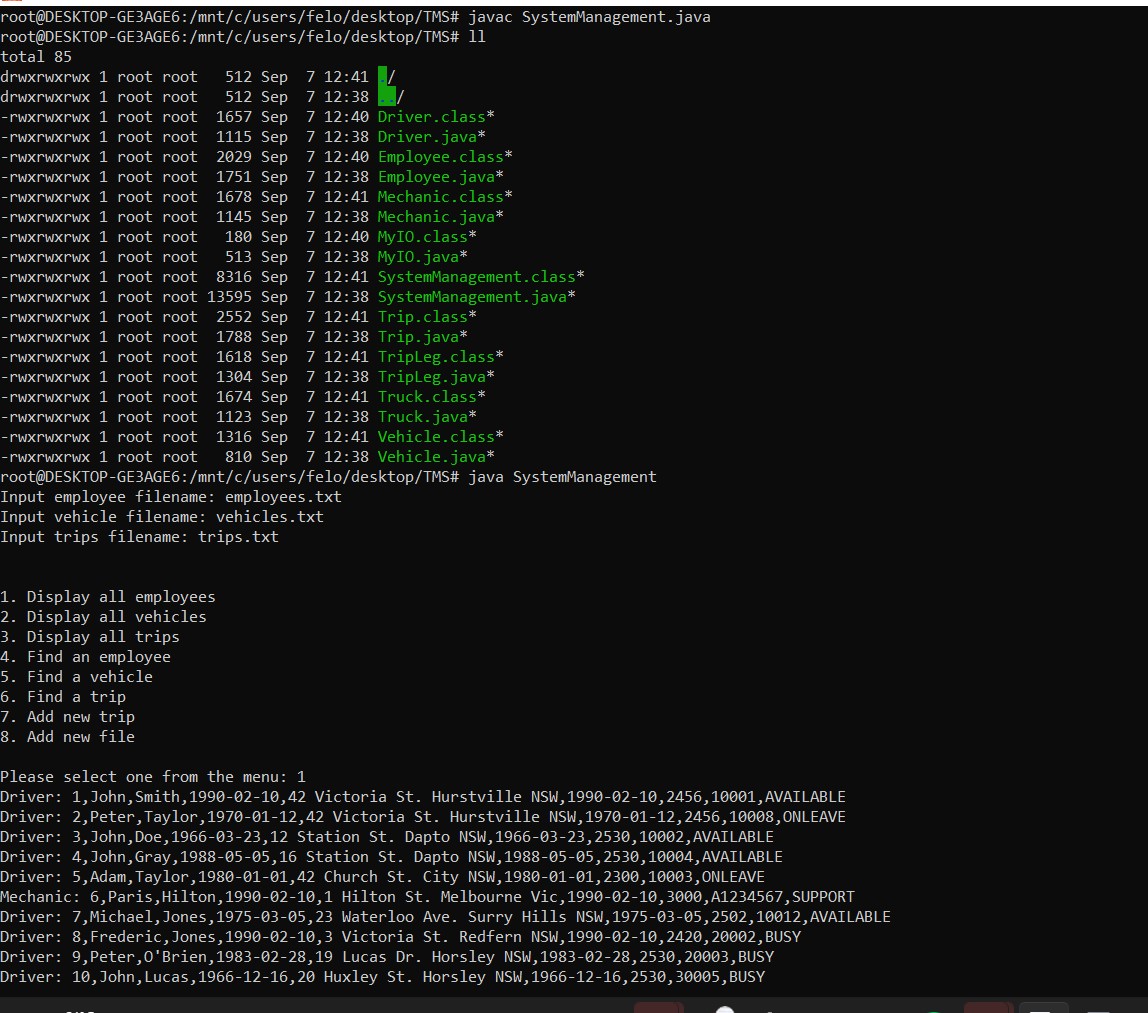
Please select one from the menu: 1
Input employee filename: employees.txt
Load succeeds.
Input vehicle filename: vehicles.txt
Load succeeds.
Input trip filename: trips.txt Load succeeds.
- Load data
- Display all employees
- Display all vehicles
- Display all trips
- Find an employee
- Find a vehicle
- Find a trip
- Add a trip
- Save data
- Exit
Please select one from the menu: 2
D,1,John,Smith,1990-02-10,42 Victoria St. Hurstville NSW,2456,10001,AVAILABLE
D,2,Peter,Taylor,1970-01-12,42 Victoria St. Hurstville
NSW,2456,10008,ONLEAVE
D,3,John,Doe,1966-03-23,12 Station St. Dapto NSW,2530,10002,AVAILABLE
D,4,John,Gray,1988-05-05,16 Station St. Dapto NSW,2530,10004,AVAILABLE
D,5,Adam,Taylor,1980-01-01,42 Church St. City NSW,2300,10003,ONLEAVE
M,6,Paris,Hilton,1990-02-10,1 Hilton St. Melbourne
Vic,3000,A1234567,SUPPORT
D,7,Michael,Jones,1975-03-05,23 Waterloo Ave. Surry Hills
NSW,2502,10012,AVAILABLE
D,8,Frederic,Jones,1990-02-10,3 Victoria St. Redfern
NSW,2420,20002,BUSY
D,9,Peter,O’Brien,1983-02-28,19 Lucas Dr. Horsley NSW,2530,20003,BUSY
D,10,John,Lucas,1966-12-16,20 Huxley St. Horsley NSW,2530,30005,BUSY
M,11,Lady,Gaga,1990-02-10,3 Pork st. Hobart Tas,7000,B1234567,SUPPOER
D,12,John,Fox,1975-10-15,18 Victoria St. Hurstville NSW,2456,40002,BUSY
D,13,Adam,Fox,1990-02-10,45 Victoria St. Hurstville NSW,2456,20045,AVAILABLE
D,14,Phillip,Cox,1984-12-12,5 The Avenue Rockdale
NSW,2300,20055,AVAILABLE
D,15,Andrew,Smith,1969-04-04,42 Bambaramba Ave. Pennant Hills
NSW,2556,20065,AVAILABLE
D,16,Andrew,Smith,1992-04-01,67 King Cr. Hurstville
NSW,2456,10305,AVAILABLE
D,17,Michael,Potter,1995-04-01,568 Bong Bong St. Horsley
NSW,2530,10345,AVAILABLE
D,18,Harry,Potter,1995-04-01,568 Bong Bong St. Horsley NSW,2530,10705,AVAILABLE
D,19,James,Bond,1990-02-10,7 Alan Bond St. Perth
WA,6000,40005,AVAILABLE
M,20,Robin,Hood,1990-02-10,6 Nottingham Pl. Sydney
NSW,2000,A7654321,SUPPORT
- Load data
- Display all employees
- Display all vehicles
- Display all trips
- Find an employee
- Find a vehicle
- Find a trip
- Add a trip
- Save data
- Exit
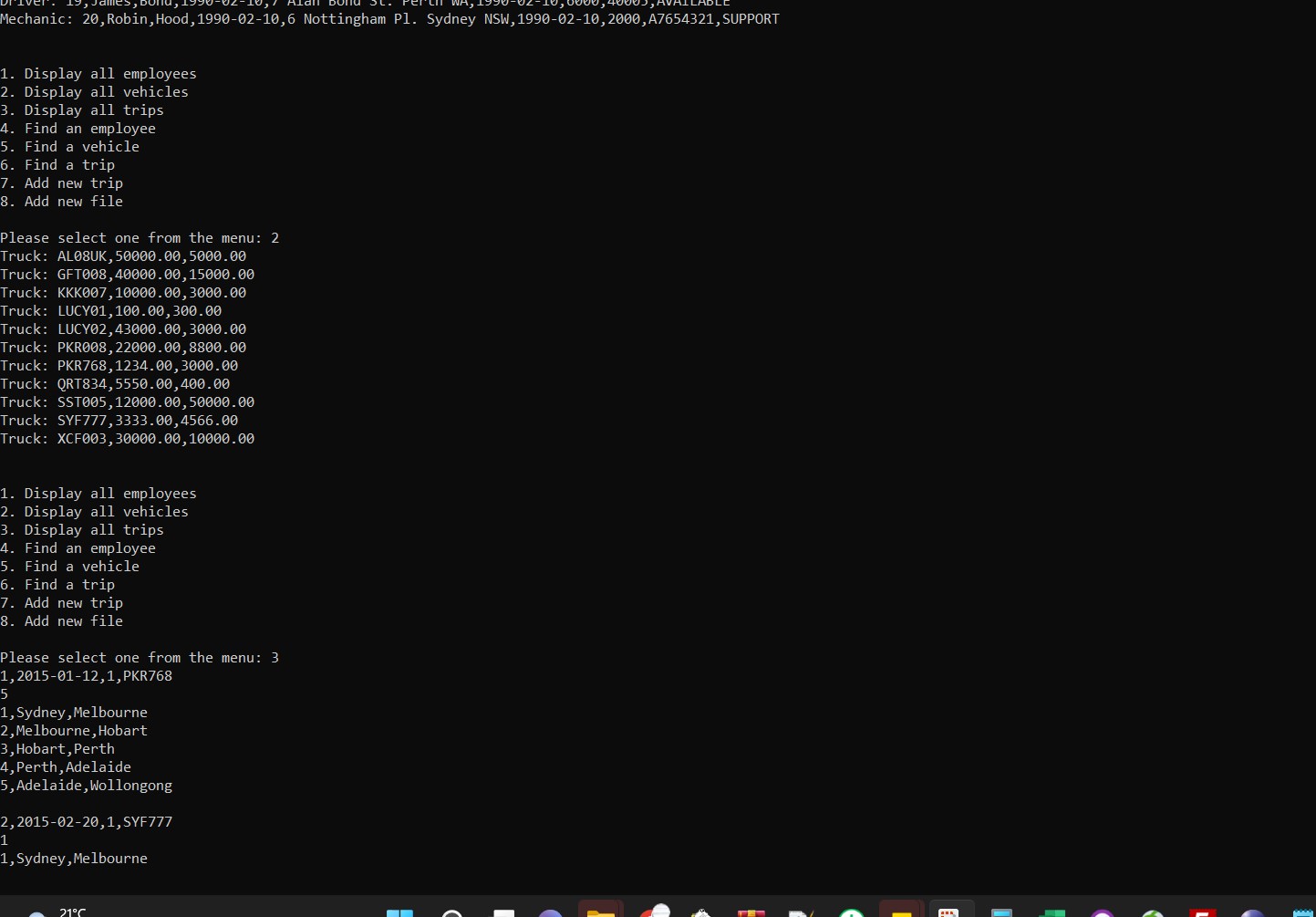
Please select one from the menu: 3
T,AL08UK,50000.0,5000.0
T,GFT008,40000.0,15000.0
T,KKK007,10000.0,3000.0
T,LUCY01,100.0,300.0
T,LUCY02,43000.0,3000.0
T,PKR008,22000.0,8800.0
T,PKR768,1234.0,3000.0
T,QRT834,5550.0,400.0
T,SST005,12000.0,50000.0 T,SYF777,3333.0,4566.0
T,XCF003,30000.0,10000.0
V,TMY001,Delivery
V,SUE001,People-Mover
- Load data
- Display all employees
- Display all vehicles
- Display all trips
- Find an employee
- Find a vehicle
- Find a trip
- Add a trip
- Save data
- Exit
Please select one from the menu: 4 1,2015-01-12,1,PKR768
5
1,Sydney,Melbourne
2,Melbourne,Hobart
3,Hobart,Perth
4,Perth,Adelaide
5,Adelaide,Wollongong 2,2015-02-20,1,SYF777
1
1,Sydney,Melbourne
3,2015-03-12,1,KKK007
1
1,Sydney,Melbourne
4,2015-06-29,1,PKR768
1
1,Sydney,Melbourne
5,2015-01-12,7,PKR768
1
1,Melbourne,Sydney
6,2015-02-20,3,SYF777
1
1,Melbourne,Sydney
7,2015-03-12,9,KKK007
1
1,Melbourne,Sydney
8,2015-01-13,1,PKR768
3
1,Sydney,Newcastle
2,Newcastle,Brisbane
3,Brisbane,Perth
9,2015-09-17,3,QRT834
1
1,Sydney,Melbourne
10,2015-12-15,9,KKK007
1
1,Sydney,Wollongong
11,2016-01-23,5,SST005
1
1,Melbourne,Sydney
12,2016-03-12,3,PKR768
1
1,Melbourne,Sydney
13,2015-04-23,7,QRT834
2
1,Sydney,Melbourne
2,Melbourne,Sydney
14,2015-04-23,7,PKR008
1
1,Wollongong,Sydney
15,2015-05-24,9,PKR768
1
1,Sydney,Melbourne
16,2014-08-02,9,SST005
1
1,Sydney,Wollongong
17,2014-09-17,7,QRT834
2
1,Sydney,Wollongong
2,Wollongong,Sydney
18,2014-12-15,1,KKK007
1
1,Melbourne,Sydney
19,2016-01-23,9,SST005
1
1,Melbourne,Sydney
20,2016-03-12,5,PKR768
1
1,Sydney,Melbourne
21,2012-04-23,1,QRT834 1
1,Wollongong,Sydney
22,2012-04-23,9,PKR008
1
1,Melbourne,Sydney
23,2012-05-25,5,PKR768
1
1,Wollongong,Sydney
24,2012-08-02,7,SST005
1
1,Sydney,Melbourne
25,2014-01-12,1,PKR768
4
1,Melbourne,Sydney
2,Sydney,Perth
3,Perth,Sydney
4,Sydney,Brisbane
26,2013-02-20,1,SYF777
1
1,Brisbane,Sydney
27,2013-03-12,7,KKK007
1
1,Sydney,Wollongong
28,2010-06-29,9,PKR768
2
1,Sydney,Melbourne
2,Melbourne,Perth
29,2010-09-17,1,QRT834
1
1,Sydney,Perth
30,2010-12-15,3,KKK007
2
1,Melbourne,Sydney
2,Sydney,Melbourne
31,2010-01-23,5,SST005
1
1,Sydney,Melbourne
32,2010-03-12,7,PKR768
1
1,Sydney,Melbourne
33,2003-04-23,9,QRT834
1
1,Sydney,Melbourne
34,2004-04-23,9,PKR008
1
1,Wollongong,Sydney
35,2017-05-24,1,PKR768
4
1,Sydney,Melbourne
2,Melbourne,Adelaide
3,Adelaide,Perth
4,Perth,Sydney
- Load data
- Display all employees
- Display all vehicles
- Display all trips
- Find an employee
- Find a vehicle
- Find a trip
- Add a trip
- Save data
- Exit
Please select one from the menu: 5 Input a employee number: 200 The employee does not exist.
- Load data
- Display all employees
- Display all vehicles
- Display all trips
- Find an employee
- Find a vehicle
- Find a trip
- Add a trip
- Save data
- Exit
Please select one from the menu: 5
Input a employee number: 20
M,20,Robin,Hood,1990-02-10,6 Nottingham Pl. Sydney
NSW,2000,A7654321,SUPPORT
- Load data
- Display all employees
- Display all vehicles
- Display all trips
- Find an employee
- Find a vehicle
- Find a trip
- Add a trip
- Save data
- Exit
Please select one from the menu: 6 Input a vehicle rego: ABCDEF The vehicle does not exist.
- Load data
- Display all employees
- Display all vehicles
- Display all trips
- Find an employee
- Find a vehicle
- Find a trip
- Add a trip
- Save data
- Exit
Please select one from the menu: 6
Input a vehicle rego: SUE001
V,SUE001,People-Mover
- Load data
- Display all employees
- Display all vehicles
- Display all trips
- Find an employee
- Find a vehicle
- Find a trip
- Add a trip
- Save data
- Exit
Please select one from the menu: 7
Input a trip date: 2022-08-21 No trip on this date.
- Load data
- Display all employees
- Display all vehicles
- Display all trips
- Find an employee
- Find a vehicle
- Find a trip
- Add a trip
- Save data
- Exit
Please select one from the menu: 7
Input a trip date: 2004-04-23
34,2004-04-23,9,PKR008
1
1,Wollongong,Sydney
- Load data
- Display all employees
- Display all vehicles
- Display all trips
- Find an employee
- Find a vehicle
- Find a trip
- Add a trip
- Save data
- Exit
Please select one from the menu: 8
Input a trip number: 36
Input a trip date: 2022-08-21
Input an employee number: 19
Input a vehicle rego: SUE001
Input the number of trip legs: 2
Input a leg number: 1
Input a departure: Harbin
Input a destination: Chengdu
Input a leg number: 2
Input a departure: Chengdu
Input a destination: Harbin This trip has been added.
- Load data
- Display all employees
- Display all vehicles
- Display all trips
- Find an employee
- Find a vehicle
- Find a trip
- Add a trip
- Save data
- Exit
Please select one from the menu: 4
1,2015-01-12,1,PKR768
5
1,Sydney,Melbourne
2,Melbourne,Hobart
3,Hobart,Perth
4,Perth,Adelaide
5,Adelaide,Wollongong 2,2015-02-20,1,SYF777
1
1,Sydney,Melbourne
3,2015-03-12,1,KKK007
1
1,Sydney,Melbourne
4,2015-06-29,1,PKR768
1
1,Sydney,Melbourne
5,2015-01-12,7,PKR768
1
1,Melbourne,Sydney
6,2015-02-20,3,SYF777
1
1,Melbourne,Sydney
7,2015-03-12,9,KKK007
1
1,Melbourne,Sydney
8,2015-01-13,1,PKR768
3
1,Sydney,Newcastle
2,Newcastle,Brisbane
3,Brisbane,Perth
9,2015-09-17,3,QRT834
1
1,Sydney,Melbourne
10,2015-12-15,9,KKK007
1
1,Sydney,Wollongong
11,2016-01-23,5,SST005
1
1,Melbourne,Sydney
12,2016-03-12,3,PKR768
1
1,Melbourne,Sydney
13,2015-04-23,7,QRT834
2
1,Sydney,Melbourne
2,Melbourne,Sydney
14,2015-04-23,7,PKR008
1
1,Wollongong,Sydney 15,2015-05-24,9,PKR768 1
1,Sydney,Melbourne
16,2014-08-02,9,SST005
1
1,Sydney,Wollongong
17,2014-09-17,7,QRT834
2
1,Sydney,Wollongong
2,Wollongong,Sydney
18,2014-12-15,1,KKK007
1
1,Melbourne,Sydney
19,2016-01-23,9,SST005
1
1,Melbourne,Sydney
20,2016-03-12,5,PKR768
1
1,Sydney,Melbourne
21,2012-04-23,1,QRT834
1
1,Wollongong,Sydney
22,2012-04-23,9,PKR008
1
1,Melbourne,Sydney
23,2012-05-25,5,PKR768
1
1,Wollongong,Sydney
24,2012-08-02,7,SST005
1
1,Sydney,Melbourne
25,2014-01-12,1,PKR768
4
1,Melbourne,Sydney
2,Sydney,Perth
3,Perth,Sydney
4,Sydney,Brisbane
26,2013-02-20,1,SYF777
1
1,Brisbane,Sydney
27,2013-03-12,7,KKK007
1
1,Sydney,Wollongong
28,2010-06-29,9,PKR768
2
1,Sydney,Melbourne
2,Melbourne,Perth
29,2010-09-17,1,QRT834
1
1,Sydney,Perth
30,2010-12-15,3,KKK007
2
1,Melbourne,Sydney
2,Sydney,Melbourne
31,2010-01-23,5,SST005
1
1,Sydney,Melbourne
32,2010-03-12,7,PKR768 1
1,Sydney,Melbourne
33,2003-04-23,9,QRT834
1
1,Sydney,Melbourne
34,2004-04-23,9,PKR008
1
1,Wollongong,Sydney
35,2017-05-24,1,PKR768
4
1,Sydney,Melbourne
2,Melbourne,Adelaide
3,Adelaide,Perth
4,Perth,Sydney
36,2022-08-21,19,SUE001
2
1,Harbin,Chengdu
2,Chengdu,Harbin
- Load data
- Display all employees
- Display all vehicles
- Display all trips
- Find an employee
- Find a vehicle
- Find a trip
- Add a trip
- Save data
- Exit
Please select one from the menu: 9
Input trip filename: newTrips.txt Save succeeds.
- Load data
- Display all employees
- Display all vehicles
- Display all trips
- Find an employee
- Find a vehicle
- Find a trip
- Add a trip
- Save data
- Exit
Please select one from the menu: 1 Input employee filename: employees.txt
Load succeeds.
Input vehicle filename: vehicles.txt
Load succeeds.
Input trip filename: newTrips.txt Load succeeds.
- Load data
- Display all employees
- Display all vehicles
- Display all trips
- Find an employee
- Find a vehicle
- Find a trip
- Add a trip
- Save data
- Exit
Please select one from the menu: 4
1,2015-01-12,1,PKR768
5
1,Sydney,Melbourne
2,Melbourne,Hobart
3,Hobart,Perth
4,Perth,Adelaide
5,Adelaide,Wollongong 2,2015-02-20,1,SYF777
1
1,Sydney,Melbourne
3,2015-03-12,1,KKK007
1
1,Sydney,Melbourne
4,2015-06-29,1,PKR768
1
1,Sydney,Melbourne
5,2015-01-12,7,PKR768
1
1,Melbourne,Sydney
6,2015-02-20,3,SYF777
1
1,Melbourne,Sydney
7,2015-03-12,9,KKK007
1
1,Melbourne,Sydney
8,2015-01-13,1,PKR768
3
1,Sydney,Newcastle
2,Newcastle,Brisbane
3,Brisbane,Perth
9,2015-09-17,3,QRT834
1
1,Sydney,Melbourne
10,2015-12-15,9,KKK007
1
1,Sydney,Wollongong
11,2016-01-23,5,SST005
1
1,Melbourne,Sydney
12,2016-03-12,3,PKR768
1
1,Melbourne,Sydney
13,2015-04-23,7,QRT834
2
1,Sydney,Melbourne
2,Melbourne,Sydney
14,2015-04-23,7,PKR008
1
1,Wollongong,Sydney
15,2015-05-24,9,PKR768
1
1,Sydney,Melbourne
16,2014-08-02,9,SST005
1
1,Sydney,Wollongong
17,2014-09-17,7,QRT834
2
1,Sydney,Wollongong
2,Wollongong,Sydney
18,2014-12-15,1,KKK007
1
1,Melbourne,Sydney
19,2016-01-23,9,SST005
1
1,Melbourne,Sydney
20,2016-03-12,5,PKR768
1
1,Sydney,Melbourne
21,2012-04-23,1,QRT834
1
1,Wollongong,Sydney
22,2012-04-23,9,PKR008
1
1,Melbourne,Sydney
23,2012-05-25,5,PKR768
1
1,Wollongong,Sydney
24,2012-08-02,7,SST005
1
1,Sydney,Melbourne
25,2014-01-12,1,PKR768
4
1,Melbourne,Sydney
2,Sydney,Perth
3,Perth,Sydney
4,Sydney,Brisbane
26,2013-02-20,1,SYF777
1
1,Brisbane,Sydney
27,2013-03-12,7,KKK007
1
1,Sydney,Wollongong
28,2010-06-29,9,PKR768
2
1,Sydney,Melbourne
2,Melbourne,Perth
29,2010-09-17,1,QRT834
1
1,Sydney,Perth
30,2010-12-15,3,KKK007
2
1,Melbourne,Sydney
2,Sydney,Melbourne
31,2010-01-23,5,SST005
1
1,Sydney,Melbourne
32,2010-03-12,7,PKR768
1
1,Sydney,Melbourne 33,2003-04-23,9,QRT834 1
1,Sydney,Melbourne
34,2004-04-23,9,PKR008
1
1,Wollongong,Sydney
35,2017-05-24,1,PKR768
4
1,Sydney,Melbourne
2,Melbourne,Adelaide
3,Adelaide,Perth
4,Perth,Sydney
36,2022-08-21,19,SUE001 2
1,Harbin,Chengdu
2,Chengdu,Harbin
1,2015-01-12,1,PKR768
5
1,Sydney,Melbourne
2,Melbourne,Hobart
3,Hobart,Perth
4,Perth,Adelaide
5,Adelaide,Wollongong 2,2015-02-20,1,SYF777
1
1,Sydney,Melbourne
3,2015-03-12,1,KKK007
1
1,Sydney,Melbourne
4,2015-06-29,1,PKR768
1
1,Sydney,Melbourne
5,2015-01-12,7,PKR768
1
1,Melbourne,Sydney
6,2015-02-20,3,SYF777
1
1,Melbourne,Sydney
7,2015-03-12,9,KKK007
1
1,Melbourne,Sydney
8,2015-01-13,1,PKR768
3
1,Sydney,Newcastle
2,Newcastle,Brisbane
3,Brisbane,Perth
9,2015-09-17,3,QRT834
1
1,Sydney,Melbourne
10,2015-12-15,9,KKK007
1
1,Sydney,Wollongong
11,2016-01-23,5,SST005
1
1,Melbourne,Sydney
12,2016-03-12,3,PKR768
1
1,Melbourne,Sydney 13,2015-04-23,7,QRT834 2
1,Sydney,Melbourne
2,Melbourne,Sydney
14,2015-04-23,7,PKR008
1
1,Wollongong,Sydney
15,2015-05-24,9,PKR768
1
1,Sydney,Melbourne
16,2014-08-02,9,SST005
1
1,Sydney,Wollongong
17,2014-09-17,7,QRT834
2
1,Sydney,Wollongong
2,Wollongong,Sydney
18,2014-12-15,1,KKK007
1
1,Melbourne,Sydney
19,2016-01-23,9,SST005
1
1,Melbourne,Sydney
20,2016-03-12,5,PKR768
1
1,Sydney,Melbourne
21,2012-04-23,1,QRT834
1
1,Wollongong,Sydney
22,2012-04-23,9,PKR008
1
1,Melbourne,Sydney
23,2012-05-25,5,PKR768
1
1,Wollongong,Sydney
24,2012-08-02,7,SST005
1
1,Sydney,Melbourne
25,2014-01-12,1,PKR768
4
1,Melbourne,Sydney
2,Sydney,Perth
3,Perth,Sydney
4,Sydney,Brisbane
26,2013-02-20,1,SYF777
1
1,Brisbane,Sydney
27,2013-03-12,7,KKK007
1
1,Sydney,Wollongong
28,2010-06-29,9,PKR768
2
1,Sydney,Melbourne
2,Melbourne,Perth
29,2010-09-17,1,QRT834
1
1,Sydney,Perth
30,2010-12-15,3,KKK007 2
1,Melbourne,Sydney
2,Sydney,Melbourne
31,2010-01-23,5,SST005
1
1,Sydney,Melbourne
32,2010-03-12,7,PKR768
1
1,Sydney,Melbourne
33,2003-04-23,9,QRT834
1
1,Sydney,Melbourne
34,2004-04-23,9,PKR008
1
1,Wollongong,Sydney
35,2017-05-24,1,PKR768
4
1,Sydney,Melbourne
2,Melbourne,Adelaide
3,Adelaide,Perth
4,Perth,Sydney
36,2022-08-21,19,SUE001
2
1,Harbin,Chengdu
2,Chengdu,Harbin
- Load data
- Display all employees
- Display all vehicles
- Display all trips
- Find an employee
- Find a vehicle
- Find a trip
- Add a trip
- Save data
- Exit
Please select one from the menu: 20 Input 1-7 for the selections.
- Load data
- Display all employees
- Display all vehicles
- Display all trips
- Find an employee
- Find a vehicle
- Find a trip
- Add a trip
- Save data
- Exit
Please select one from the menu: 0
Bye